What does it mean if I get DFEE02 when I tap a contactless card?

What does it mean if I get DFEE02 when I tap a contactless card?

First, check whether the card has an NFC/contactless symbol. If it does not, it is probably not a financial payment card that supports NFC contactless payment. It may be a MIFARE card instead.

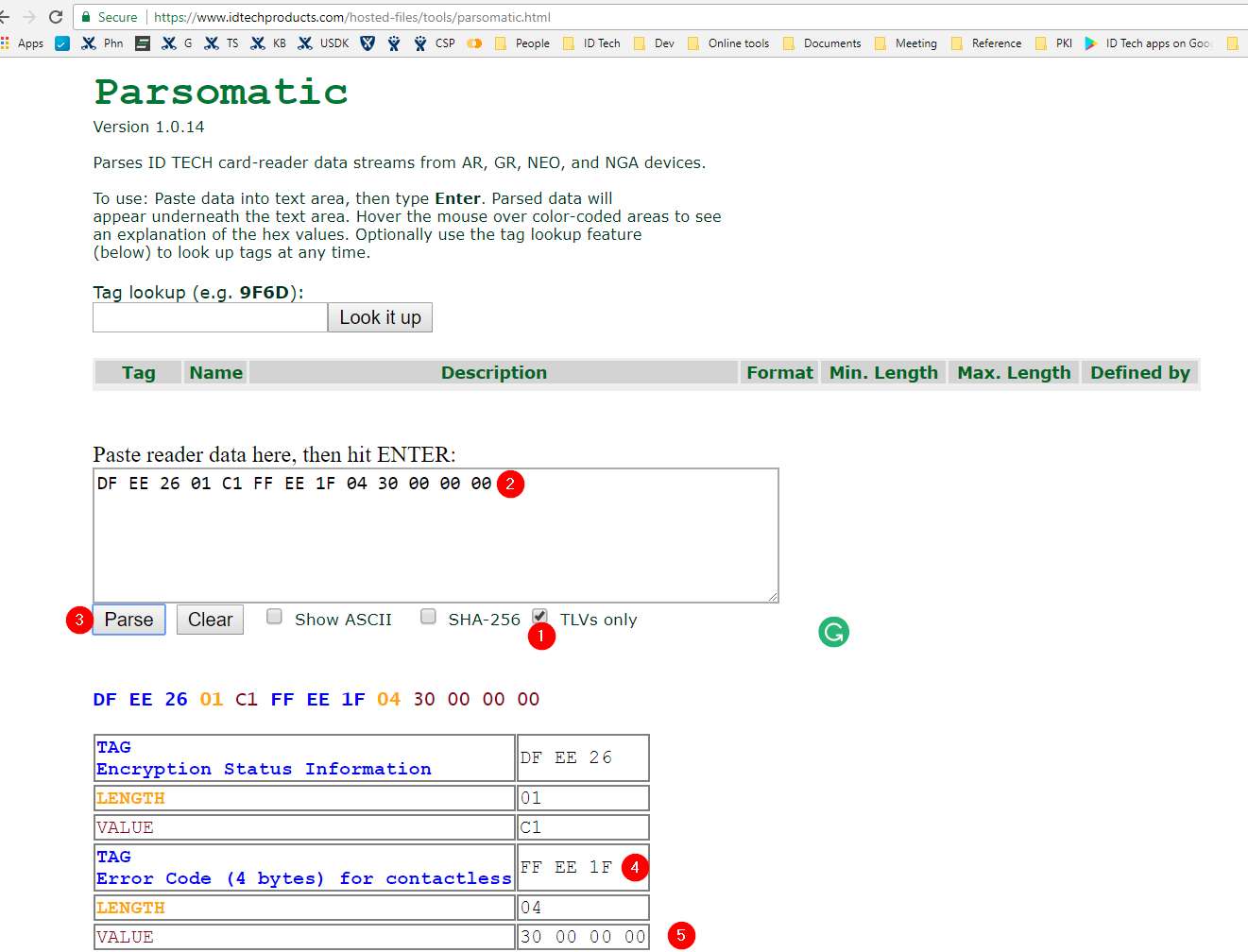
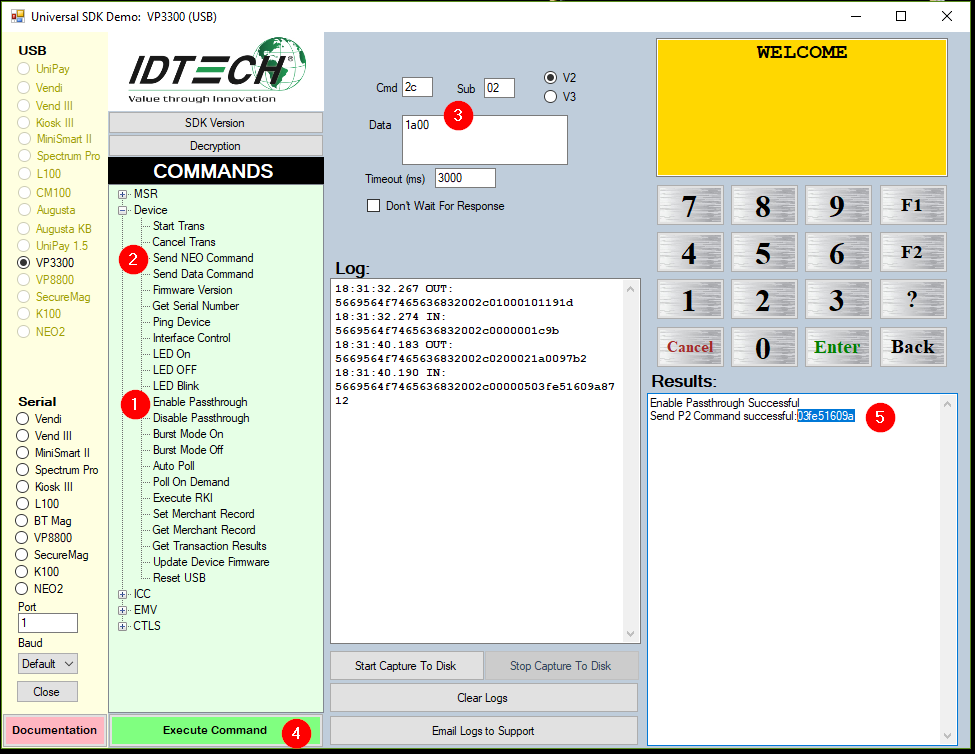
The best way to determine this is to parse the unencrypted tags using Parsomatic. In the example below, a Start Contactless command was issued, a card was tapped, and unencrypted tags were returned.

Copy the unencrypted tags into Parsomatic (2), select the TLVs only checkbox (1), and click Parse (3), as shown below.

Tag DFEE02 (shown as FFEE1F on older ID TECH devices) contains the contactless error detail returned by the reader. The value is four bytes: Byte 1 is the contactless error code, Bytes 2 and 3 are SW1/SW2 from the card, and Byte 4 is the RF State Code indicating where the error occurred in the reader-card transaction flow.

Use the following reference tables to interpret the Error Code and RF State Code values in Tag DFEE02.

Contactless error codes in Tag DFEE02

Error Code

Description

Suggested interpretation

Error Code

Description

Suggested interpretation

00h

No Error

No error was reported.

01h

Out of Sequence Command

The reader did not receive commands in the correct order.

02h

Go to Contact Interface

The contactless transaction failed. If supported, complete the transaction on the contact interface.

03h

Transaction Amount is Zero

The reader may terminate the transaction if the terminal is offline-only and the amount is zero.

04h

Go To Other Interface

The transaction failed. If supported, complete the transaction on another interface.

05h

Go To Nearby Interface

The transaction failed. If another nearby contact interface is available, use it.

06h

Go To MagStripe Interface

The transaction failed. If available, complete the transaction using magstripe.

08h

Transaction Timeout

The transaction timed out. Restart the transaction.

20h

Card returned Error Status

The card returned SW1/SW2 not equal to 9000h. Use SW1/SW2 and the RF State Code to determine where the failure occurred.

21h

Collision Error

More than one contactless card was in the reader field.

22h

Amount Over Maximum Limit

The transaction amount exceeds the terminal contactless transaction limit.

23h

Request Online Authorization

The reader is returning data needed for online authorization.

24h

Card Communication Error

A communication error occurred while interacting with the card, such as card removal from the field.

25h

Card Blocked

The reader does not support the card based on application capability configuration.

26h

Card Expired

The reader date is later than the card expiration date. This is valid for qVSDC cards.

27h

Unsupported Card

The card type or AID is not supported or recognized by the reader.

30h

Card did not respond

The card was removed from the field or a communication error prevented the response from reaching the reader. Use the RF State Code to identify when it occurred.

40h

Unknown Data Element Error

The data element is unknown.

41h

Data Element Missing

A mandatory or required data element was missing from the card.

42h

Card Generated AAC

The card declined the transaction by sending an AAC instead of a TC.

43h

Card Generated ARQC

The card generated an ARQC while the terminal or reader was configured as offline-only.

44h

SDA/DDA Failed (Not Supported by Card)

The card did not indicate support for the required authentication method.

50h

SDA/DDA/CDDA Failed (CA Public Key)

Data authentication failed because the required CA public key is missing.

51h

SDA/DDA/CDDA Failed (Issuer Public Key)

Data authentication failed while recovering the issuer public key.

52h

SDA Failed (SSAD)

Data authentication failed during SSAD.

53h

DDA/CDDA Failed (ICC Public Key)

Data authentication failed while recovering the ICC public key.

54h

DDA/CDDA Failed (Dynamic Signature Verification)

Data authentication failed during dynamic signature verification.

55h

Processing Restrictions Failed

The EMV processing restrictions step failed, often because of configuration.

56h

Terminal Risk Management Failed

The EMV terminal risk management step failed, often because of configuration.

57h

Cardholder Verification Failed

The EMV cardholder verification step failed, often because of configuration.

58h

Terminal Action Analysis Failed

The EMV terminal action analysis step failed, often because of configuration.

59h

Card Expired (Interac)

The card is expired for Interac processing.

5Ah

Cardholder Verification Failed (Interac)

Cardholder verification failed for Interac processing.

61h

SD Memory Error

An SD memory error occurred while retrieving transaction logs.

62h

Generic Error

A general error occurred and no more specific reason is available.

63h

Card returned Data Element Error

The card returned an invalid data element.

73h

Torn Transaction Log Error

An error occurred while cleaning the torn transaction log.

80h

No Merchants have been configured

Merchant ID or merchant data is empty or missing.

81h

TLV Parse Failure

Card response TLV parsing failed.

82h

Merchant Data Error

No merchant data was returned from the card.

83h

System Memory Error

The reader failed to read or write system memory.

84h

Application Skip Error

Configuration is inconsistent about whether to skip the payment application.

85h

Application Version Error

The application version number is incorrect.

88h

LTPK Error

The long-term private key has not been loaded.

RF State Codes in Tag DFEE02

State Code

RF State

Description

State Code

RF State

Description

00h

None

RF State Code not available.

01h

PPSE

Error occurred during PPSE command.

02h

SELECT

Error occurred during SELECT command.

03h

GPO

Error occurred during GET PROCESSING OPTIONS command.

04h

READ RECORD

Error occurred during READ RECORD command.

05h

GEN AC

Error occurred during GEN AC command.

06h

CCC

Error occurred during CCC command.

07h

IA

Error occurred during IA command.

08h

SDA

Error occurred during SDA processing.

09h

DDA

Error occurred during DDA processing.

0Ah

CDA

Error occurred during CDA processing.

0Bh

TAA

Error occurred during TAA processing.

0Ch

UPDATE RECORD

Error occurred during UPDATE RECORD command.

10h

GET DATA (Ticket)

Error occurred during GET DATA command to retrieve the ticket.

11h

GET DATA (Ticketing Profile)

Error occurred during GET DATA command to retrieve the ticketing profile.

12h

GET DATA (Balance)

Error occurred during GET DATA command to retrieve the balance.

13h

GET DATA (All)

Error occurred during GET DATA command to retrieve all data.

20h

PUT DATA (Ticket)

Error occurred during PUT DATA command for the ticket.