ViVOconfig - Home
IT-ADMIN G (Deactivated)
Chris Barton
ViVOconfig is an invaluable tool that will capture the complete configuration (including AIDs, CAPKs and Terminal settings) of a reader and allow it to be saved to a file. That file then be applied to different reader. Use it to ensure that a reader has the same configuration as a know good unit.
Announcement:
Just completed! ID TECH announces the next major update to ViVOConfig.
Major Updates:
- Now uses SDK 2.1.x.x, which is a multi-device SDK. This app can now connect to any number of devices, any interfaces, and at the same time. In the screenshot, there is an Augusta and two VP3300 attached
- Device Connection Options....
- USB connections are automatic
- Selecting a COM device will automatically connect to default baud on the only existing COM port
- if there are multiple COM ports, you wil be asked which one to use
- If you want to use another baud, be sure to change that before you attempt to connect (another option in that menu
- You can connect to IP using standard or TLS connections
- You can disconnect from any device. If you disconnect from USB, you either need to plug/unplug to get it to auto-recognize, or you can select Scan USB Bus instead
- Device Connection Options....
- ViVOConfig now contains the complete command tree from our USDK demo
- Within ViVOConfig, you can now do things like RKI updates, firmware updates, setting command, verifying a transaction, etc., without the need to switch our USDK demos
- "Memo" field -> allows custom command execution
- There is a Memo field that can now be included in the JSON files.
- The memo field can simply be used to add information about the files.
- The Memo field can be used by the ViVOConfig to determine if any custom code needs to be executed.
- When writing files to the device, ViVOConfig will look at the memo first to understand if anything special needs to happen.
- Currently, there is just one string recognized for custom command execution. As we find cases in the future, we can define other strings to do special things.
- Current Custom Command recognized strings from memo field:
- "SET-DFED22": If this is found in the memo, the utility will change DFED22 to be <serial number>-<emv kernel version> for that particular device being configured
Minor enhancements and fixes:
- Added file name checking for valid value when loading ViVOconfig files. (the previous version crashed on this case)
- Updated 03-05 to keep last AID listing in memory if called on next command {previous version sending too many unnecessary aid commands during the reading process)
- Removed FFE4 when saving ctls data group 0 in VivoConfig (the previous version failed when writing group 0)
- Fixed get CTLS group parsing in VivoConfig (the previous version had issue parsing CTLS groups)
- Added Augusta Beeper control to VivConfig (the previous version only recorded beeper setting on VP3300, not Augusta)
- Added retryCount to IDTComm class to set command retries on timeout condition (overcomes timeout issues when writing)
- Added min timeout to IDTComm class to override command timeout. (overcomes timeout issues when writing)
- Added reporting both fw and sn on device connection
click to enlarge...
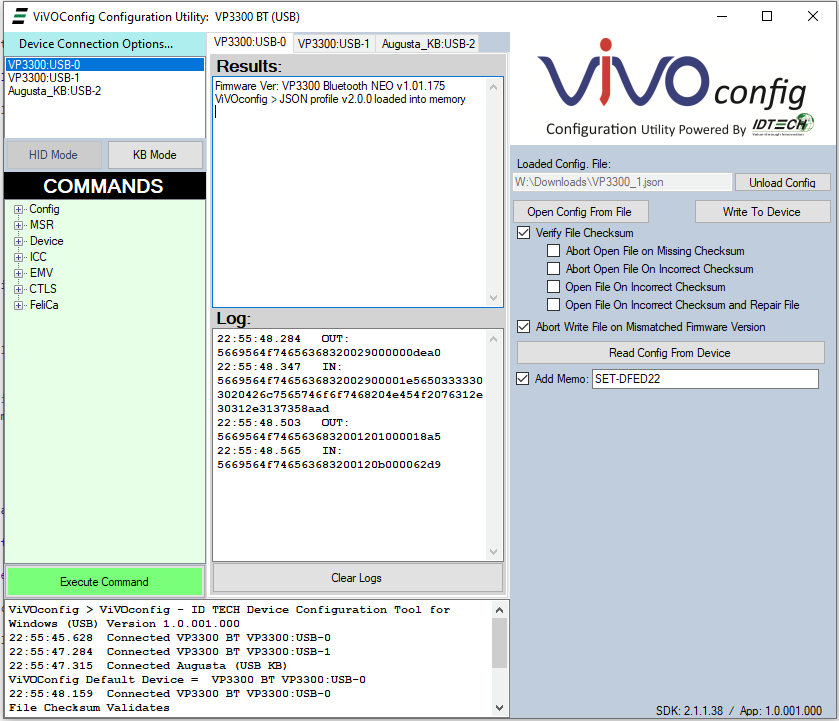
NOTE: For any bug reporting (either internally or from customers), please be sure to include both SDK version and App version, located in the lower corner of the utility.
ViVOconfig Files:
| File | Modified | |
|---|---|---|
|
PDF File ViVOconfig User Manual.pdf Rev D |
Aug 06, 2020 by Chris Barton | |
|
ZIP Archive ViVOconfig.zip 80000802-007 ViVOConfig Utility_V1.0.001.117 w/ SDK 2.1.2.216 |
Feb 01, 2023 by Danni Zhang |
Available Configurations:
| File | Modified | |
|---|---|---|
|
File AugustaKB, GoChip.json Use the ViVOconfig tool to apply this configuration file to a Augusta reader |
Oct 16, 2019 by IT-ADMIN G | |
|
File AugustaHID,GoChip.json Use the ViVOconfig tool to apply this configuration file to a Augusta reader |
Oct 16, 2019 by IT-ADMIN G | |
|
File VP5300 with Contatless and L100; Generic Testing Configuration.json v.001; Generic Testing Configuration; 3C with contact and contactless and L100 PIN pad for VISA/MC/Amex/Disocver |
Dec 26, 2019 by IT-ADMIN G | |
|
File Augusta QCKB, Generic config for testing.json Use the ViVOconfig tool to apply this configuration file to a Augusta reader |
Jan 02, 2020 by IT-ADMIN G | |
|
File VP3300usb QCKB, Generic config for testing; CT, MSR.json Rev. 3 (changed dfef6e in grp 0 from 020d0d to 010d one CR), Use the ViVOconfig tool to apply this configuration file to a VP3300usb reader. Requires firmware v.182 or higher. |
May 22, 2020 by IT-ADMIN G | |
|
File VP3300usb QCKB, Generic config for testing CT, CTL, MSR.json Load this file using ViVOconfig. You can perform test transactions in any text editor. Read chip cards, contactless cards and MSR cards. See fall back to MSR after 3 failed chip reads |
May 22, 2020 by IT-ADMIN G | |
|
File NEO 1.01 - VP3300 and VP8300 in HID mode Generic Testing Configuration.json v.001; Generic Testing Configuration; 4C contact terminal data and contactless for VISA/MC/Amex/Disocver |
Sept 20, 2023 by Chinan Lu | |
|
File VP3300 and VP8300 in HID mode GoChip.json Use the ViVOconfig tool to apply this configuration file to a VP3300USB reader. This configuration works for GoChip API HID mode |
Sept 20, 2023 by Chinan Lu | |
|
File Vendi Generic Testing Configuration.json v.001; Generic Testing Configuration; contactless configuration for VISA/MC/Amex/Discover/Interac |
Sept 20, 2023 by Chinan Lu |